

Tutorials & How-To's
Balancing academics and athletics can be a lot—these quick tutorials are here to help. From accessing course materials to managing your schedule, each guide is designed to walk you through the tools you’ll use most at GVSU.
Tutorials include:
- Using Blackboard to stay on top of classwork
- Setting up Navigate and booking advising appointments
- Finding your student schedule and major advisor
- Saving time with GVSU tools like myBanner and Laker Dock
Whether you're just starting out or need a quick refresher, these how-tos will keep you on track in and out of the classroom.
GVSU Main Page Navigation
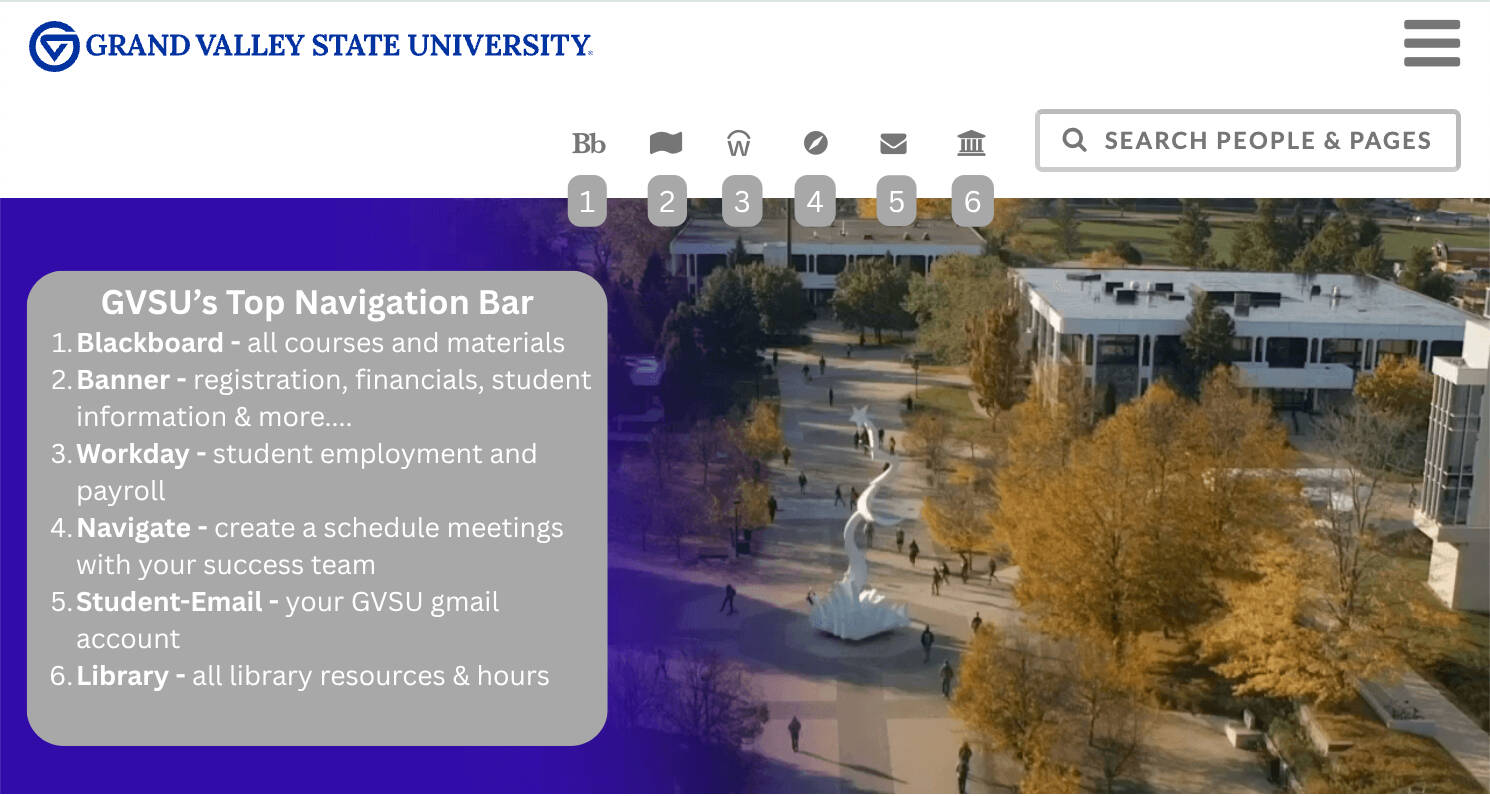
Need help navigating GVSU's systems? These short tutorials will walk through the tools student-athletes use most, from scheduling advising appointments to using Blackboard. Click the corresponding accordion tabs to view the various tutorials. Curious about what's on GVSU's mainpage and what you can access? Look at the infographic to see what you can access directly from gvsu.edu (the institution's main page)
Blackboard Tutorial

Blackboard is GVSU’s main learning management system (LMS) where you’ll find course announcements, assignments, grades, and messages from your professors.
If you’re new to Blackboard or just want to learn how to get the most out of it, check out our Blackboard Tutorial Playlist. These short videos will walk you through everything from logging in and navigating your courses to submitting assignments and tracking grades.
Click to view Blackboard Tutorial Playlist
To access Blackboard:
- Type lms.gvsu.edu into your browser or click this link or to access GVSU's Blackboard site.
Still have questions? Click this link to view GVSU's Technology Support Information regarding Blackboard and Blackboard Ultra
GVSU Save Tutorial
What is GVSU SAVE?
GVSU SAVE is a program designed to save you money on course materials by delivering them digitally, right through Blackboard. Instead of tracking down books and codes on your own, your materials are ready for you on day one—no waiting, no extra hassle.
Why use it?
- Lower cost: SAVE prices are negotiated directly with publishers.
- Convenient: Materials show up in your Blackboard courses automatically.
- Correct edition: No guessing which version of the book you need.
Can I opt out?
Yes! If you prefer to buy your own materials elsewhere, you can opt out by the posted deadline and receive a full refund.
Click to watch the GVSU SAVE tutorial - learn how to access your materials
Click to learn more about GVSU save from the Laker Store Website
EAB Navigate Tutorial
What is Navigate?
Navigate is GVSU’s student planning tool that helps you stay on top of your academic life. It’s where you can book advising appointments, find your class schedule, and identify your major advisor—all in one place.
Why use it?
- Easily schedule advising appointments — no endless emails
- Quickly access your current schedule and advisor info
How do I get started?
Log in at gvsu.edu/navigate. This tutorial will show you how to access GVSU's navigate, schedule your first advising appointment, and make the most of its features.
FAQs Link
Still have questions? Click Here to visit the FAQ page