

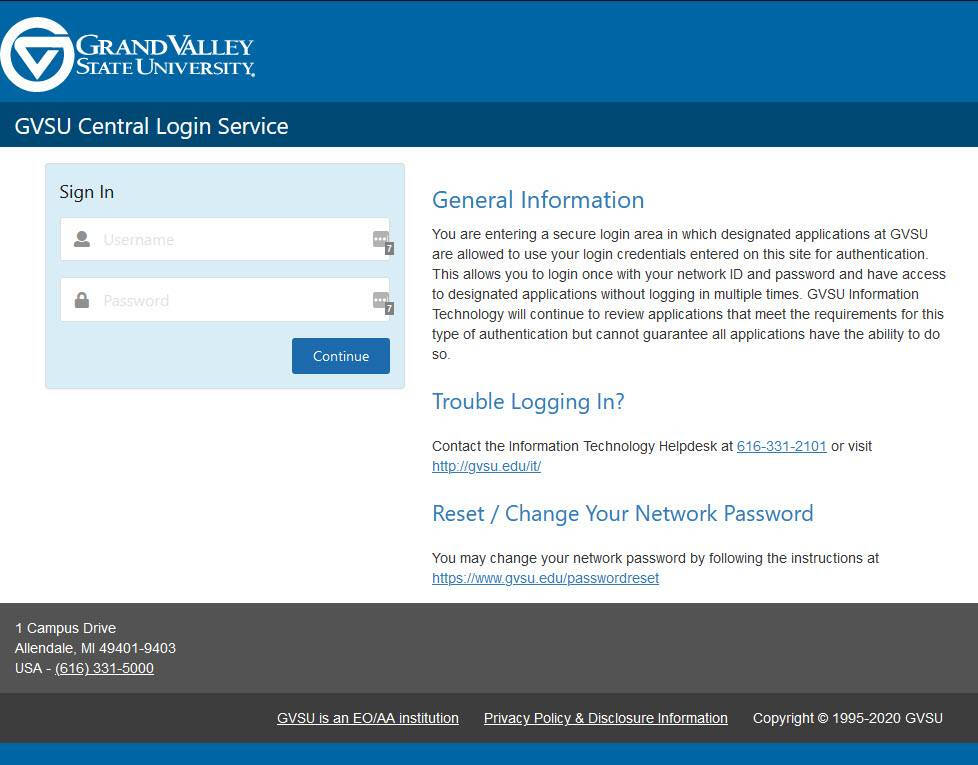
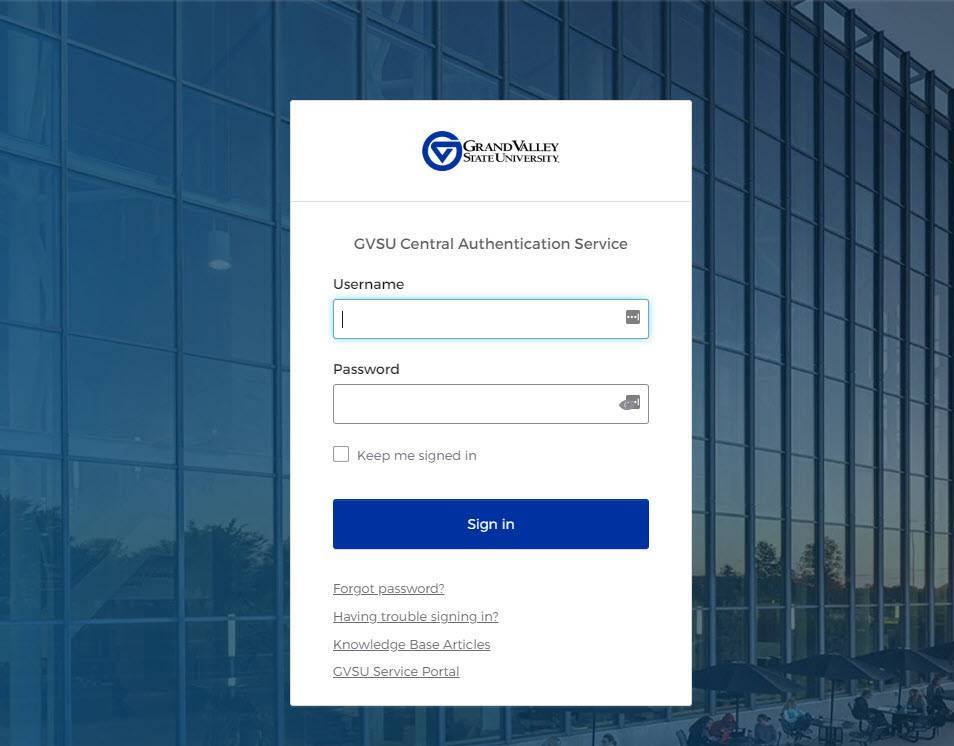
With the introduction of Okta, we are switching to a new and enhanced login interface. Its purpose is to improve security and the user experience at GVSU.
GVSU Login Screen (OLD)
GVSU Login Screen (NEW)
Okta Perks:
As an added benefit of enrolling with Okta, we're excited to announce two new changes that will enhance your security and convenience.
- We are extending the password expiration period to 18 months, giving you more time to use your existing password before needing to update it.
- We are extending multi-factor authentication (MFA) to 7 days per device and per browser, providing you with added flexibility and ease-of-use while still maintaining the highest levels of security.
We're constantly striving to improve our services and these updates are just one example of our ongoing commitment to your safety and satisfaction.
Okta connects any person with any application on any device!
By linking all your apps, logins and devices into a unified account a user can launch any application with a single click and be automatically logged in without having to re-enter credentials. Furthermore, users can customize their self-service dashboard to add applications that meet their needs and remain productive by eliminating the need to sign-in to each application.
Okta is one of the world's leading independent identity partners. They free everyone to safely use any technology—anywhere, on any device or app. Okta enables secure access, authentication, and automation. With flexibility and neutrality at the core of their Okta Workforce Identity and Customer Identity Clouds, business leaders and developers can focus on innovation and accelerate digital transformation, thanks to customizable solutions and more than 7,000 pre-built integrations. Okta is building a world where Identity belongs to us.
Learn more at okta.com
With Okta, you can be up and running on day one, with every app and program you need to work, instantly available.
Whether you're at your desktop or on the go, Okta seamlessly connects you to everything you need, providing a better overall experience and simplifying the way you access applications.
One of the features we love about Okta is its simple and intuitive dashboard, which allows you to manage everything from one central location. You no longer need to save multiple logins or struggle to remember different passwords. Okta consolidates all your apps and logins into one easy-to-use platform, making it easier and more efficient to get the applications you need for work.
Okta provides improved security, adding an extra layer of protection to your network, data, and your personal information. With features such as multi-factor authentication (MFA), Okta ensures that only authorized individuals have access to your applications and data. It features single sign-on (SSO) capability so, you can use your GVSU account to sign in to all your applications from one central location, without having to remember multiple passwords. This makes it easier to access your applications and improves overall productivity.
The best part, Okta is available on and off-campus, even on mobile devices, allowing you to access your applications and data from anywhere, at any time. This means you don't have to be at your desk to use Okta and can be productive even when you're on the go.
Okta offers a simplified and secure way to access all your GVSU applications and more from a single platform. Here are some of the benefits:
-
Single sign-on (SSO): With Okta, GVSU employees can sign in once and access all their applications without the need to remember multiple usernames and passwords.
-
Improved productivity: By providing a centralized platform for accessing applications, Okta simplifies the process of finding and launching our applications, this saves us time and improves overall productivity.
-
Enhanced security: Okta adds an extra layer of security to user accounts by implementing features like multi-factor authentication (MFA) and risk-based authentication, which help to protect your data and prevent unauthorized access.
-
Self-service: Okta provides users with a self-service portal, which allows them to manage their own accounts, reset passwords, and perform other tasks without the need for IT support.
-
Flexibility and accessibility: Okta is available on any device, allowing users to access their applications and data from anywhere, at any time.
Okta truly simplifies the user experience by providing a single platform for accessing all their applications, improving productivity, and enhancing security, while also providing self-service and flexibility to meet our hard working Laker needs.
- Check your email: GVSU IT will send you an email invitation to join Okta. Check your email and look for an email saying, "Welcome to Okta".
-
Verify your account: Click the link in the email to access your account. You will be directed to set up your MFA options. For more information visit Okta | Getting Started
-
Log in to Okta: Once you set up your MFA options, you can log into Okta by going to my.gvsu.edu.
-
Launch your apps: After logging in and using your MFA, you will see a list of all the applications you have access to, you can also search, add, and remove apps. For more information visit Okta | Adding and Removing Apps
-
Explore Okta: Okta provides a range of features and tools to help you manage your applications and secure your data. Have fun! Take some time to explore the platform and familiarize yourself with its features, such as single sign-on (SSO), multi-factor authentication (MFA), and self-service account management.
We are proud and excited to offer the Okta Homepage at my.gvsu.edu
Through the Okta Homepage Lakers can manage their own accounts, reset passwords, and perform other self-service tasks without the need for IT support. It also provides users with access to various tools and features to improve their productivity, such as a universal search function, mobile app support, and integration with third-party applications.
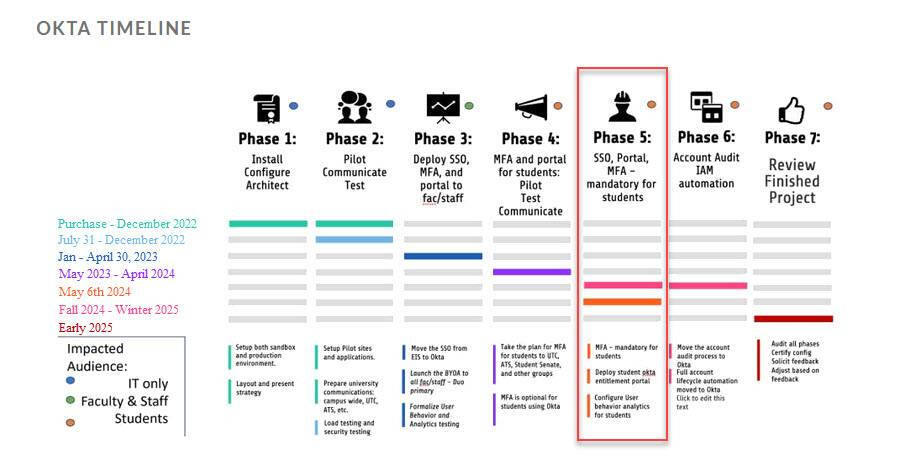
Okta Timeline
Accounts Impacted by Okta
|
Account |
Welcome Email |
MFA Enrollment |
|---|---|---|
|
Faculty & Staff Accounts |
Will receive a "Welcome to Okta" email |
Enrollment beginning May 3rd |
|
Student Accounts |
Will not receive a "Welcome to Okta" email |
No enrollment required |
|
Student Accounts for clubs or teams |
Will not receive a "Welcome to Okta" email |
No enrollment required |
|
Email-Only Accounts (Outlook or Office365) |
Will not receive a "Welcome to Okta" email |
No enrollment required |
|
Shared Departmental Accounts currently not using DUO |
Will receive a "Welcome to Okta" email |
Enrollment optional |
|
All other types of accounts such as Vendor, Student Worker, Guest, Temporary, Sponsor, etc... |
Will receive a "Welcome to Okta" email |
Enrollment beginning May 3rd |
Okta Videos
Okta - Getting Started

Okta - What is Okta?
Okta - Dashboard
Okta - End User Video