
Blog
Experimenting with an Artificial Intelligence Image Generator
September 01, 2025
When using artificial intelligence (AI) image generators, the user enters a prompt into the program and in response an image is almost instantly created. That prompt can then be refined, tweaking words and phrases to get closer to the desired outcome. Depending on the image generator, composition and style references can be uploaded and various effects and filters selected. The user can do this over and over, until the desired image is achieved.
Let’s take a look at three different AI- generated images created with Adobe Firefly. Unlike other AI-image generators, Adobe Firefly only draws its imagery from licensed and paid for content, meaning that the original artists receive payment for any content used in AI-generated images.
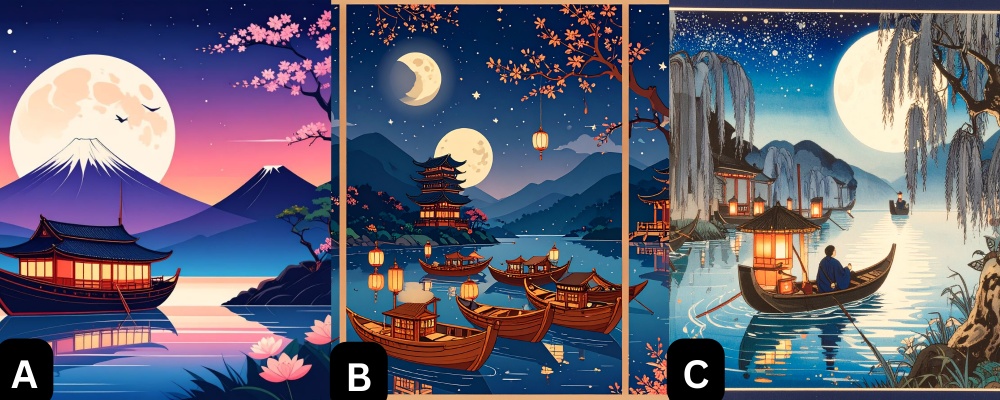
Looking at this blog’s banner you will see three different images
labeled, A, B, and C.
The prompt for A was “a pleasant boat scene
at night in the ukiyo-e style.” The image result is very much in the
style of Adobe Creative Suite apps and not in the style of ukyio-e,
which typically uses flat perspective, outlines, and often features
movement. The image features Mount Fuji, which is well known in
ukiyo-e through Hokusai’s series Thirty-six Views of Mount
Fuji, but added another mountain nearby which is neither true to
Hokusai’s images or to life.
For B, the prompt was “a pleasant night scene, boats on a river,
stars and moon, flat perspective, in the style of a Japanese woodblock
print.” For this one, we also added a woodblock
print from the GVSU Art Museum’s collection as a composition
reference image in the hopes that it would pull in the colors and
perspective. Firefly separated the image into three panels, like the
reference image, and overall perspective did get slightly flatter.
However, the boats oddly merge, and the image has two moons.
Finally for C, we used the prompt “Pleasant night scene, boats on
a river, stars and moon, in the style of a historic Japanese woodblock
print, ukiyo-e”. We switched the image we
used in B to a style reference, and added another image from
the GVSU Art Museum collection as a composition reference. We also
told Firefly to use “cool tones”. The resulting image features
movement in the water, and a figure who, if you zoom in, has no face.
For some reason, Firefly added mountains in every iteration, and often added pagoda towers and floating lanterns, both on the boats and in the sky. None of these additions were requested in the prompt, but may be coded in Firefly’s algorithm as “Japanese pagoda” or “Japanese lantern”, thus causing Firefly to generate them into the images. In the process of refining our prompts, other generated images featured multiple boats merging, boats where the lanterns were a part of them, figures with no faces, and night skies with multiple moons. Overall, the images generated did not meet expectations and were full of visual mistakes. However, as an art museum, Firefly is still preferable to other image generators since the content is licensed and artists receive compensation for the use of their artwork.
Users creating images with AI-generated programming must also be aware of the environmental cost. Data centers and computer servers used to host AI systems require constant electricity usage and generate a lot of heat. That heat transfers to the surrounding environment, and drinkable water is used to keep the servers cool, resulting in the billions of gallons of water being used for this purpose every year.
After adding various effects, reference images, prompts, and style options, we created fifty-six images of “a pleasant night scene”. While accurately calculating the amount of energy and water used is difficult, most sources use the estimate of 16 ounces of water per every images. That’s 896 ounces, or 7 gallons of water. So, we used 7 gallons of water for 56 images that, in the end, didn’t really give a satisfactory result. Is it worth it?
Interested in learning more about how AI is changing the artworld? Check out our other blog.