
Registration Information
How to Register for Courses
You can register for classes online in a few quick steps:
1. Go to myBanner and login using your Network ID and password
2. Select the Student tab > Registration
3. Select 'Student Registration Self Service'
Course registration can also be done in person at any of our Student Assistance Centers (Allendale, Grand Rapids Pew Campus, Holland, or Traverse City).
Academic Calendar
Click to view the academic calendar for the upcoming year.
University Catalog
Click to view the University Catalog.
Check your myPath
All students are encouraged to discuss program choices with their advisor and review their myPath prior to registration.
myPath is a tool designed to assist students in preparing for and tracking their progress toward graduation. It encompasses both a degree analysis audit and an educational planner.
Visit our myPath site for details on how to take full advantage of this tool.
View this short video for instruction on how to login and navigate through your myPath
Finish Faster with 15 Credits
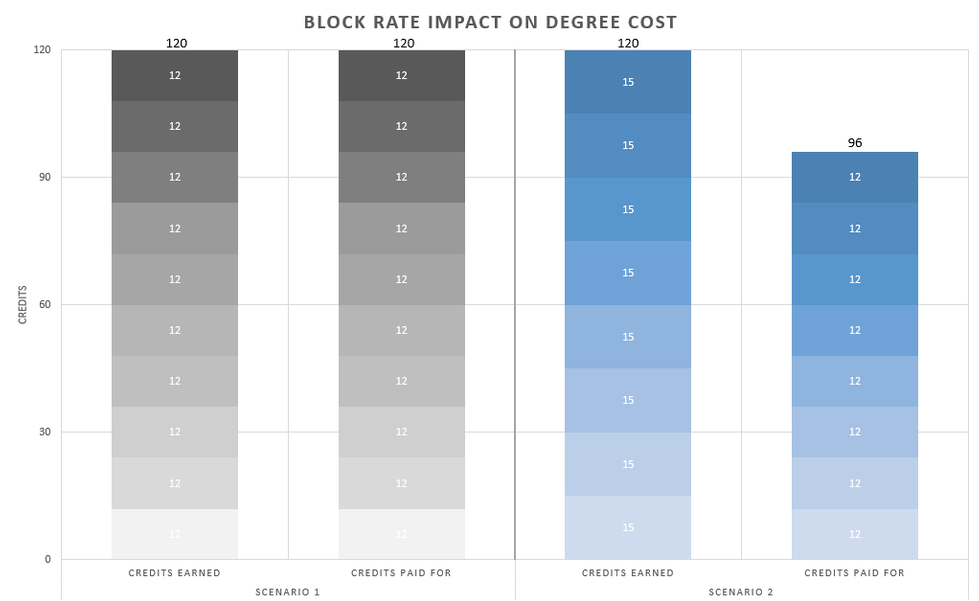
Scenario 1: Students enrolled in 12 credits per semester won't be using the block rate. These students will accumulate 120 credits in five years and will have paid tuition for 120 credits.
Scenario 2: Students enrolled in 15 credits each semester are in the block rate (paying for 12 credits). These students will accumulate 120 credits in four years, and have paid tuition for 96 credits.
Students who earn at least 15 credits per semester not only pay less in tuition, they are also more likely to graduate on time compared to those who take fewer credits.
The minimum number of credits required to graduate from Grand Valley is 120.
|
Students who earn at least... |
Likelihood of Graduating in 4 Years |
|---|---|
|
15 credits in their first term |
26% more likely to graduate in 4 years |
|
30 credits in their first year |
162% more likely to graduate in 4 years |
|
60 credits in their first 2 years |
200% more likely to graduate in 4 years |
|
90 credits in their first 3 years |
294% more likely to graduate in 4 years |
For more information on the GVSU Block Rate visit our Finish Faster Website.